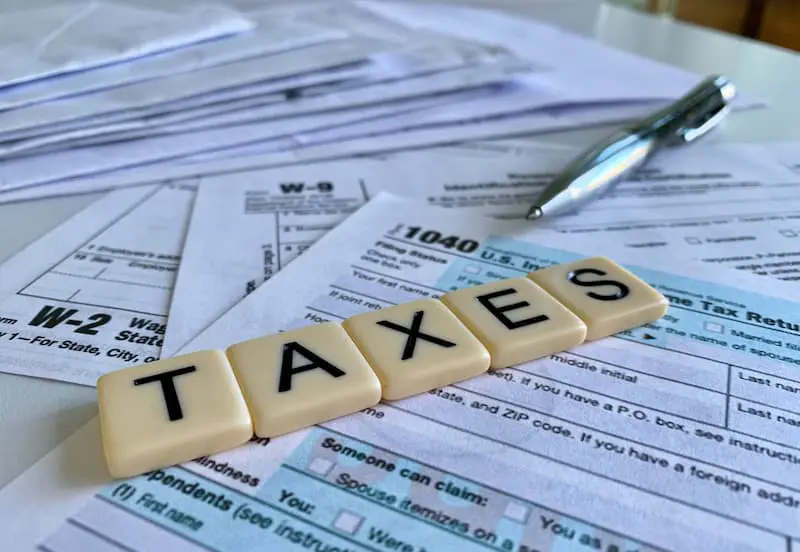
Your workflow needs software that keeps up with the demands of tax season. Slow, rigid, or hard-to-navigate systems make returns take longer and reviews feel harder. That holds true regardless of how experienced your team is.
Many preparers hold onto familiar software because switching feels disruptive. Although that comes from a place of practicality and habit, it’s worth asking whether the cost of staying is higher than the cost of making a change.
The Problem Usually Starts Small
Software problems rarely become obvious all at once. They show up in smaller ways first, like a system that stops responding or a file that won’t open. They stack up quietly until working around them is just how your office operates.
That’s often when the software shifts from being a tool to being a liability. Staff spend more time managing the system than using it, and the gaps it creates start showing up in your returns.
You should expect more from a platform you rely on every day. The best tax systems come with features that help you address problems while they’re still manageable and keep your workflow running cleanly.
Slow Performance Creates Bigger Workflow Issues
The speed at which your system processes returns directly impacts your practice. If every file takes longer to open or every transmission sits in a queue, you begin losing time across every client. It’s easy to see how a few extra minutes per return adds up across a full week.
Not only does that compress your schedule, but it also breaks your focus mid-review. And careful tax work paired with a system that keeps interrupting mix as well as oil and water.
The busiest periods make this worse. When volume is high and deadlines are stacking, slow software costs you the most.
Limited Functionality Puts You in a Box
Some systems work fine until your practice grows. As you take on more clients or more complex entity types, your requirements change. If your software cannot keep up with that, you are in for a frustrating season.
The problem gets worse when you start filling gaps with outside tools or manual processes just to complete ordinary returns. That creates a disconnected setup where accuracy becomes harder to maintain, and every filing takes more effort than it should.
A better system grows with your practice. It handles more volume and more return types without forcing you to patch gaps it should already cover. If your existing software cannot handle the returns you are preparing now, it won’t support where your practice is heading.
Manual Work Signals That Your System Is Falling Behind
Older and weaker systems tend to push more work back onto you. From re-entering client details to chasing documents scattered across email threads and local folders, you can find yourself spending more time on administration than on actual tax work.
Although many tax firms accept this as standard practice, they shouldn’t have to. Every manual step is another place where you can miss, mistype, or file something in the wrong location.
The best tax software for tax professionals reduces that exposure by automating the repetitive work and keeping client information organized in one place.
Compliance and Error Checks Should Work In Real Time
Tax software should help you catch issues before they become filing problems. Features like real-time error checks and built-in diagnostics are necessary for accuracy while you are still inside the return. If your current platform doesn’t flag problems until the end, you’re already behind.
You should also expect your software to stay up to date with compliance requirements without you having to verify it manually. When that falls on you, every review takes longer, and the margin for error grows.
A reliable system handles these things in the background, making your review faster and your filings cleaner.
Client Management Matters More Than Most Offices Realize
Client management becomes a problem the moment it slows you down. If documents are hard to locate or signatures take multiple follow-ups to collect, your office loses time on tasks that should be straightforward.
Good software addresses this by keeping client records organized and accessible in one place. It also supports secure document collection and e-signatures without requiring extra steps or outside tools. That helps your intake process run more predictably and keeps follow-up from eating into your day.
Evaluate if your current system supports that kind of setup. If it does not, it’s costing you more time on client management than you probably realize.
What a Better System Should Deliver
You don’t need feature-heavy software loaded with tools you’ll rarely use. You need a system that handles the core work cleanly and supports your office’s pace.
Look for software that includes:
- Real-time error checks and diagnostics
- E-signature support and secure document handling
- Cleaner client data management and prior-year access
- Scalable options for more return types as your practice grows
- Dependable support when issues come up during peak season
These features simplify your day and give you back the time you were spending on problems your software should have been solving all along.
Switching Becomes Easier When You Frame It Correctly
Replacing your software can feel like a major disruption, but staying with a system that holds your practice back is a slower disruption that never really ends. When the issues stack up and the pressure builds, you end up paying for it in time and errors you should not have to accept.
Don’t look at it as trying to find the “perfect system.” Look for one that supports your work better than the current one does. If your current software keeps adding pressure instead of relieving it, you already have a reason to look at what else is out there.
The right system organizes your workflow to match your goals and the pace of your practice. You can process more returns without the back-and-forth slowing you down. Clients also get a more consistent experience on their end. That is how good tax prep software gives you a competitive edge over other practices.
Video
Infographic
Effective software is essential for handling the demands of tax season, yet many preparers stick to familiar systems, fearing disruption even when the cost of staying with outdated tools outweighs the benefits of switching. Discover eight signs you need new tax software in this infographic.